New Diet Planner - weight loss chart with built in BMI calculator
 Following the success of our Diet Planner spreadsheet, we now introduce our new improved version with all these helpful features: see main screen shots below
- Plots your current & target weight over your chosen time period (red line on graph)
- Just enter your weight, in column D, each time you weigh yourself
- Creates a graph of your weight loss progress (green line on graph)
- Calculates your Body Mass Index, in column F, each time you weigh yourself
- BMI outside the "healthy" range is shown in red
- Your changing BMI is also shown on a separate graph showing how your weight loss affects your Body Mass Index
- Main weight loss graph now duplicated on a separate sheet - easier to print...
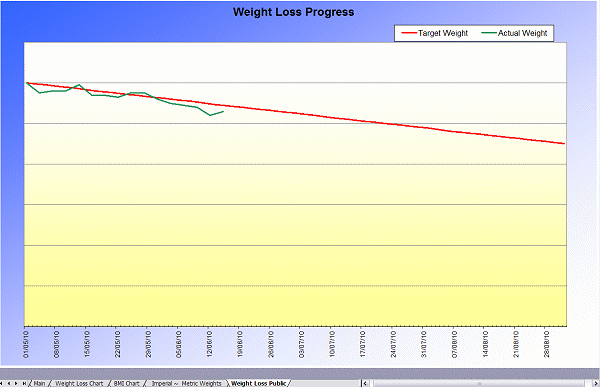
if you want to stick it on your fridge door! - Separate "public" weight loss graph, without your weight showing, if you want to print it but don't want anyone else to know your weight
- New conversion sheet which shows your current weight in lbs, stones & lbs and kg
"I have found the diet planner very motivating; being able to see my BMI come down as well as my weight is very encouraging. Would recommend it, it does help. Kind regards" Karen H
Our new Diet Planner is a Microsoft Excel Spreadsheet developed to help you easily monitor your weight loss progress, and calculate your BMI, by creating a chart of your weight loss and it works with any diet, weight loss program or even lifestyle change!
Simple to use, no knowledge of spreadsheets required - instant download, you will be using it in a few minutes time...
Setting up the Diet Planner
To set up the Diet Planner all you do is enter your current weight, target weight, start date, target date, how often you are going to weigh yourself and your height. You enter these in the six white boxes at the top - done and ready to use! It will now look like this:
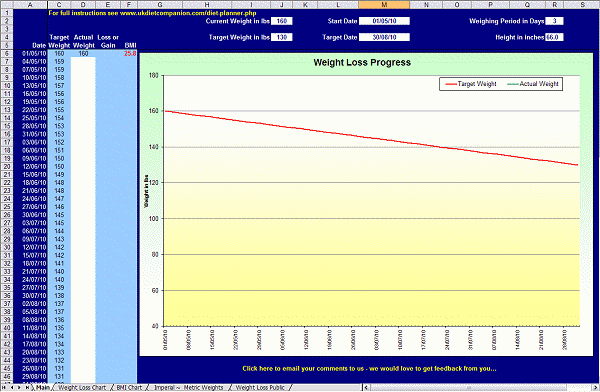
The red line on the chart shows your current weight at your start date across to your target weight at your target date. Column A shows the dates you are going to weigh yourself and column C shows what you need to weigh on each of these dates - so that you can be sure of reaching your target. Column F shows your current BMI (Body Mass Index) and in this example it starts off red because it is outside the "healthy range".
The Diet Planner Charts
Each time you weigh yourself, you simply enter your actual weight in column D and a number of things automatically happen...
“I do like this new version. It's good to have the metric, stones and lbs as well. Plus nice to see my BMI going down.” - Susan C
Weight Loss
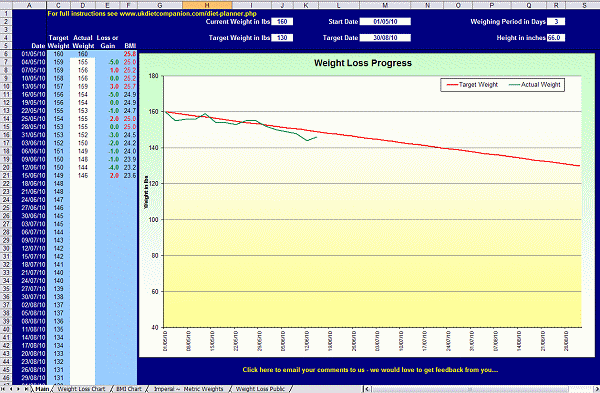
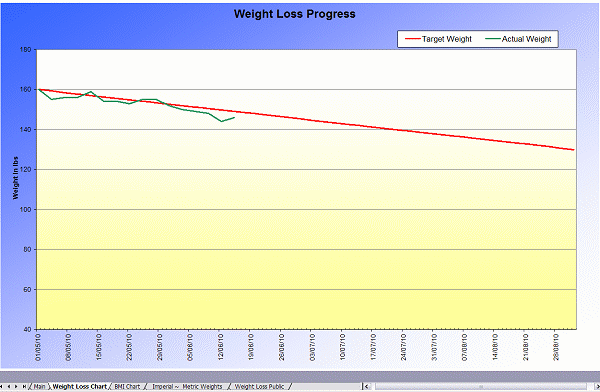
Your weight loss (or gain!) is shown in column E - this is how much your weight has changed since you last weighed yourself. Your new weight is automatically plotted on the chart as a green line so that you can compare your weight loss progress with your red line target as shown here:
BMI Calculator
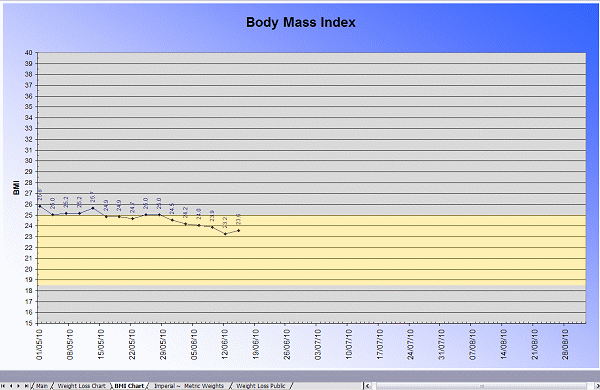
As your Body Mass Index changes as your weight changes, your new BMI is recalculated each time you weigh yourself and this is shown in column F. Your changing BMI is also automatically plotted on the separate BMI Chart. The yellow zone shown in the example below shows the "healthy range" for your height...
Weight Loss Graph
The weight loss graph from the main sheet is automatically re-created on a separate sheet so that it is easier to print out... if you want to stick it on your fridge door! It looks like this:
Weight Conversion Chart
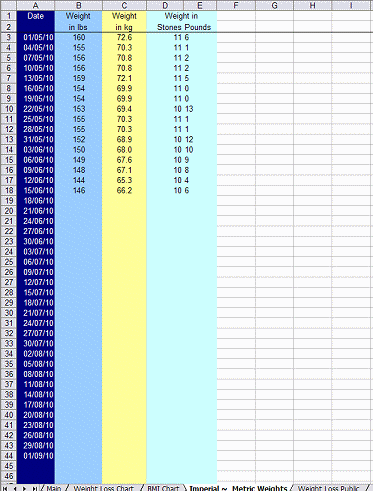 Another sheet provides you with a conversion of each of your weights into pounds, stones & pounds and kgs...
There are two versions of the new Diet Planner and you can have both:-
- "Imperial" - you enter your weight in pounds
and the graphs and charts show your weight loss in pounds
the "Metric~Imperial" sheet converts your weight... to kgs, and stones & pounds. This is the one shown in the example - "Metric" - you enter your weight in kgs
and the graphs and charts show your weight loss in kgs
the "Metric~Imperial" sheet converts your weight... to pounds, and stones & pounds
As soon as you have ordered the new Diet Planner, you instantly get a link to your special download page where you can download either the Metric or Imperial versions, or both, it's up to you.
Weight Loss Chart
Finally, a copy of your weight loss chart is automatically created on a separate sheet. This "public" weight loss chart does NOT display your actual weight so it is a chart that you can print and display without anyone knowing your weight - you can use is as a motivational tool at work for example. It is shown here:
You get all of the above charts and calculators with our new Diet Planner!
Get the unique Diet Planner now
The New Diet Planner is a Microsoft Excel Spreadsheet file and you can download it straight away. It requires Microsoft Excel 2003, Office 2003 or any more recent version. The Diet Planner is VERY easy to use but (blowing our own trumpet!) was a very complex spreadsheet for us to create so it is not compatible with other spreadsheet systems like MS Works or OpenOffice due to the advanced functionality required.
The spreadsheet was created by us, IS NOT AVAILABLE ANYWHERE ELSE, and had been fully virus checked and it is SAFE.
“Thank you for the diet-planner. I think this will be very useful to help me reach my target weight” - Katie C
It's NEW, very easy to use and you can download it now.
It doesn't matter how you are planning to lose weight - whether you are calorie counting or using any of the many different dieting methods available, our Diet Planner will help you reach your target weight by the date you want.
As a special introductory half price offer, our new Diet Planner is only £2.99 - the normal price, from 18/04/24, will be £5.99
Just click on the PayPal "Buy Now" button above and once you have completed the transaction you will be directed to a special page of our website where you can download the Diet Planner straight away.
You do not need a PayPal Account - you can use your credit or debit card - just click on the "Continue" link in the "Don't have a PayPal account?" section once you get to PayPal.
“Thank you for making this chart freely available. I found it very straight forward to use and by my competitive nature it appeals to me. I am, of course, competing with my wife so it would be quite helpful/fun to be able to chart more than one person on one chart. I thought I had a good knowledge of Excel and tried to cut and paste bits - but clearly your knowledge outstrips mine by quite a long way - I was not very successful and have settled for 2 files saved to the desktop. Well done and thank you” - Giles Y
Using the Diet Planner
To start with you simply enter the following in the top part of the Diet Planner :-
- Your current weight - lbs or kg
- Your target weight - lbs or kg
- Your height
- The date you start your diet
must be in the format dd/mm/yy - The date when you want to reach your target weight
must be in the format dd/mm/yy - How often you are going to weigh yourself
You can either work in pounds (lbs) or kilograms (kg) - the choice is yours.
We recommend you weigh yourself first thing in the morning, every 7 days. If you weigh yourself more often than that you will get daily fluctuations which may not help with your overall motivation... but if you want, you can!
Once you have entered the 6 bits of information above the Diet Planner is ready to use.
What the Diet Planner graph shows you
In column A you will see the start date of your diet followed by the dates when you are going to weigh yourself.
Column B shows what you need to weigh, each time, so that you reach your target weight by the end of your chosen period. A chart is automatically created - going from your start date to your target date and the red line on the graph shows your ideal gradual weight loss to reach your target.
“Think it is great, will use it thanks” - Aideen H
Using the Diet Planner each time you weigh yourself
Each time you weigh yourself you simply enter your weight in column D alongside each of the dates. Then, column E automatically shows you how your weight has changed from your last weighing... if you have lost weight it shows you how many lbs (or kg) you have lost in green, if you have gained weight it shows you, in red, how much you have gained!
At the same time, the chart is automatically updated with the green line on the graph showing how your weight loss is progressing compared to your gradual weight loss target - the red line.
Column F automatically shows your BMI or Body Mass Index and how this changes as you lose weight. At the same time, your BMI is automatically plotted on a separate graph. Your Body Mass Index is an important indicator of your "healthiness" and whatever your weight loss goal, you should aim to stay within the "healthy" range of 18.5 to 25.
Seeing your progress so visually on this weight loss chart is a really powerful motivational tool... after a short time on your diet you will begin to see how your chosen weight loss program is working out.
What if things are going well with your diet?
If things are going well and the green line on the graph is closely following the red line you know that you will reach your target weight by the date you want. This will really confirm to you that the efforts you are putting in ARE working and this will help you in any "moments of possible weakness"!
What if things aren't going so well?
On the other hand, if things aren't going so well and the green line is staying well above the red line on the chart, you know you need to increase your efforts - perhaps increase your daily levels of exercise, perhaps reduce or modify your daily food intake. You could also try one of the many weight loss ideas and systems shown on this website.
You will know what you should be doing and the Diet Planner will really help you with your focus and motivation. You will see that green line getting closer and closer to the red line and you will know that you will reach your target weight.
What if your weight loss is slower than you wanted?
Maybe you will not be able to get the amount of weight loss as quickly as you first wanted. Don't despair, this is not necessarily a bad thing! If you ARE losing weight, just not as quickly as you expected, all you need to do is change your target date, at the top of the Diet Planner, to a later date.
The whole Diet Planner graph will automatically change to focus on that new target date - showing you the new dates for you to weigh yourself (first column), how much you need to weigh at each of these dates (second column) and the graph will automatically change to show the new range of dates along the bottom, the red line showing your target weight will adjust to your new end date and the green line will adjust to show how you are progressing towards your target weight by your new target date.
You can adjust the target date as often as you like to make sure that your weight loss goal is achievable... and permanent... and your weight loss chart automatically adjusts to your new target date.
The Diet Planner is re-usable again and again - simply delete all past data and start all over again.
Note
Once you have started entering your weights in column 3, you can't alter your Weighing Period (Step 5 above).
“Thank you for the diet planner. I think it is really great and a very good motivational tool. I intend looking at the site in more detail to see if I can get any other information from it. The graph is very well worked out and I like comparing my progress to the target weight loss. Regards...” - Louise B
Get the Diet Planner now
As a special introductory half price offer, our new Diet Planner is only £2.99 - the normal price, from 18/04/24, will be £5.99
Just click on the PayPal "Buy Now" button above and once you have completed the transaction you will be directed to a special page of our website where you can download the Diet Planner straight away.
You do not need a PayPal Account - you can use your credit or debit card - just click on the "Continue" link in the "Don't have a PayPal account?" section once you get to PayPal.
Not convinced yet? Free Diet Planner Trial
If you want to try it out, you can download a free trial version of the new Diet Planner...
This free trial version has severely limited functionality!
It is the "Imperial" version so you have to enter your height in inches and your weight in pounds: the weighing period is fixed at 3 days (you can't alter this) and you can only enter your first 4 weights. It doesn't have the separate "Weight Chart" sheet, it doesn't have the separate "Weight Loss Public" chart and all the functionality is limited to your first 4 "weighings" but it gives you a good idea of how it works.
To download your free trial version: right click on this link and choose "Save Target as..." from the menu that appears. Save it where you want and then try it out. When you are happy, come back and get the full version...


